
Why teams use Fill PDF From CSV
- Load CSV, XLSX, or JSON rows and search records quickly.
- Choose contains/equals matching and fill by selected row.
- Use clear + refill loops to validate mapping quality before export.
Commercial workflow page
Search your records, pick a row, and fill mapped PDF templates in seconds for repeat data-entry workflows.
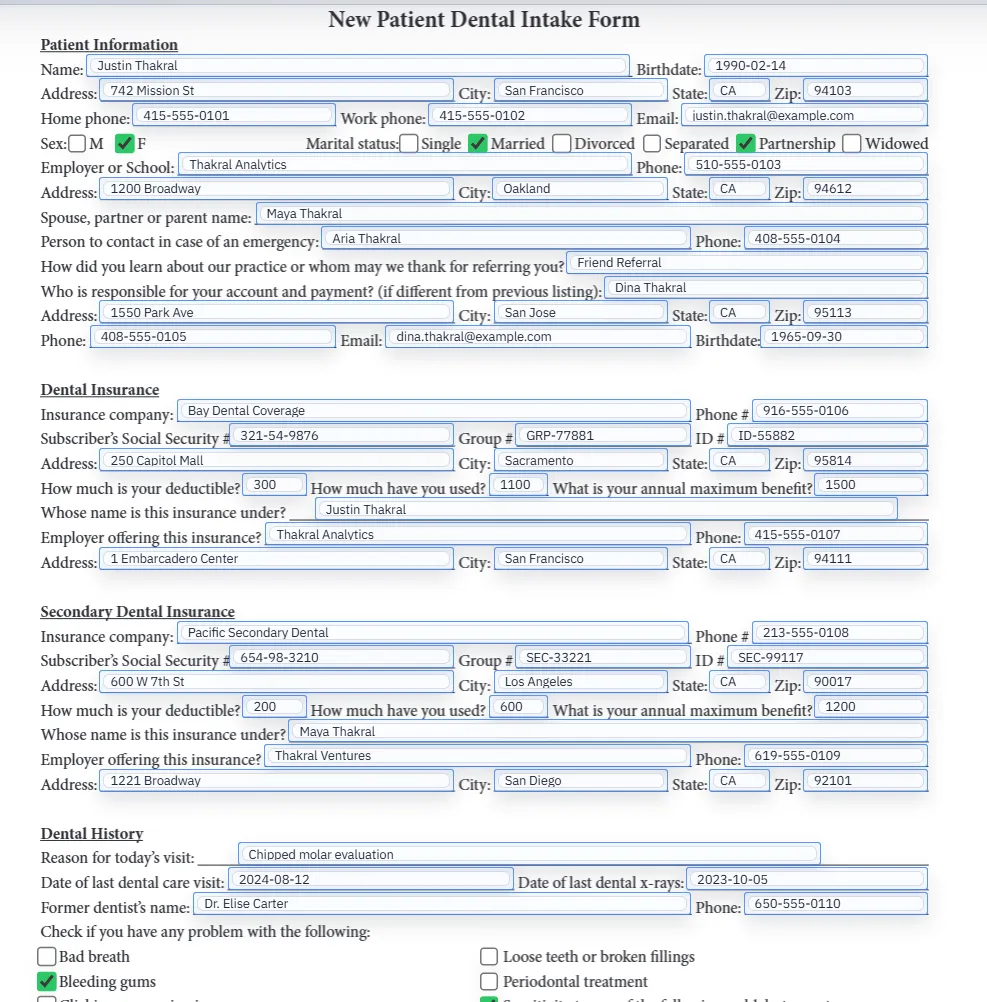
Fill from file demo
This walkthrough shows how to load a saved PDF template and auto-fill it from CSV, Excel (XLSX), or JSON rows without leaving the browser. SQL and TXT imports are schema-only mapping aids.
Use this video when you need to prove that DullyPDF can fill the same template from CSV, XLSX, and JSON rows before rolling the workflow out to the rest of the team.
The promise sounds simple: take spreadsheet rows and put them into a PDF. In practice, teams usually hit the same problems immediately. Column headers do not match field names, dates are formatted inconsistently, duplicate headers cause ambiguity, checkbox values need interpretation, and operators waste time searching for the right record before they even test the fill.
That is why the spreadsheet itself is only part of the workflow. Reliable PDF fill from CSV depends on a mapped template, predictable field naming, and a controlled record-selection step. Without those pieces, the process turns into another copy-paste task with slightly better tooling around it.
DullyPDF treats the PDF template and the row data as two separate layers. First you create or reopen a saved template with a stable field map. Then you load CSV, XLSX, or JSON data and use Search & Fill to locate the right record. The operator chooses a record, fills the document, reviews the result, and can clear and refill again without rebuilding the template.
That structure is important because it gives teams a QA loop instead of a blind batch export. Search is case-insensitive, result sets are capped for controlled review, and the operator can validate the chosen row before the document is downloaded or saved. For many business workflows, that deliberate review step is more useful than a high-volume black-box batch generator.
The fastest wins come from cleaning the schema, not from forcing more keywords into the page. Header names should be stable and descriptive, duplicate columns should be resolved intentionally, and dates or checkbox columns should follow a consistent pattern. DullyPDF normalizes headers and handles duplicate names, but the cleaner the source data is, the less template cleanup you need later.
A practical rule is to test with the row that is most likely to expose edge cases. Pick a record with long names, populated dates, and checkbox values that actually exercise the form. If that record fills cleanly, simpler rows usually follow without surprise.
Not every workflow starts from a local spreadsheet. Some teams need to collect the row data first. DullyPDF Fill By Link supports that by storing respondent submissions as structured records that can be selected later from the same Search & Fill flow. That lets teams mix operational sources: spreadsheet rows for internal exports and stored respondents for externally collected form data.
The important distinction is that the PDF still fills from structured records, not from ad hoc manual typing into the document. Whether the row came from CSV, XLSX, JSON, or a saved respondent submission, the template logic stays the same.
This route is the right landing page when a human operator already has row data and needs to search, choose, and validate one record before output. Fill By Link is different because it collects the record from a respondent first. API Fill is different because another system calls a hosted endpoint and the operator is no longer choosing rows in the browser.
Keeping those routes separated makes the query intent clearer. Spreadsheet-driven searches should land here. Respondent collection should land on Fill By Link. System-to-system generation should land on the API page. That helps searchers find the right workflow shape faster and reduces overlap between the main commercial pages.
Need deeper technical details about fill pdf from csv? Use the Rename + Mapping docs and Search & Fill docs to validate exact behavior.
Yes. After mapping, select a row in Search & Fill and DullyPDF writes matching values into PDF fields.
Yes. XLSX is supported alongside CSV and JSON for row-based Search & Fill workflows. SQL files (CREATE TABLE definitions) are supported for schema-only mapping without row data.
Review mappings and checkbox rules, then run a clear-and-refill verification pass before production output.
Yes. Owners can publish a Fill By Link from a saved template and then select respondent records from the same Search & Fill flow used for local rows.
These walkthroughs and comparison posts cover the same workflow cluster from an operator point of view, which helps you move from a route summary into a more specific implementation path.
Use these docs pages to verify the exact DullyPDF behavior behind fill pdf from csv before you ship it as a repeat workflow.
These adjacent workflow pages cover nearby search intents teams compare while evaluating fill pdf from csv.