Commercial workflow page

Collect Number Inputs by Link and Generate Calculated PDFs

Publish a web form from a saved PDF template, collect source number answers, and let DullyPDF compute calculated outputs for the generated PDF.

Workflow examples for Fill By Link Calculated PDF

DullyPDF Fill By Link calculated PDF preview showing respondent number inputs feeding a computed total.
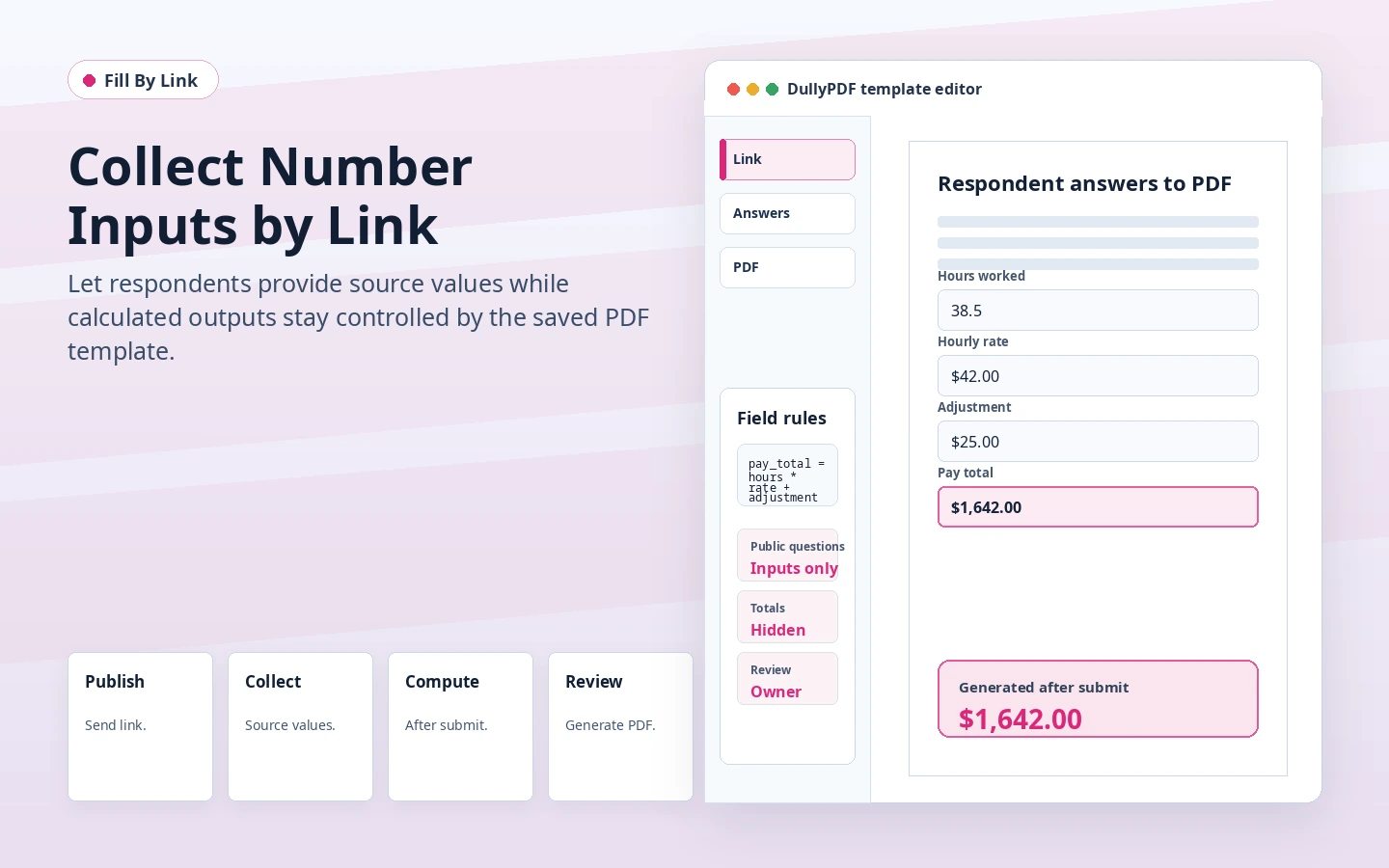
Fill By Link should collect source values from respondents while calculated outputs stay out of the public question list.
DullyPDF field editor showing calculation fields that are computed after respondent submission.
The completed PDF is generated after DullyPDF computes the calculated outputs from submitted source answers.

The public form should collect inputs, not totals

A respondent-facing form should ask for the facts the respondent can provide: quantities, hours, rates, counts, mileage, fees, or scores. It should not ask them to type a total that the template can calculate.

DullyPDF keeps that boundary by publishing number inputs as questions while keeping calculated outputs out of the web form. The generated PDF receives computed values after submission.

Why this is better than asking recipients to edit a PDF directly

Many external recipients are on phones, browser previews, or email clients where editable PDF behavior is inconsistent. A hosted web form is easier to complete, and the final PDF can be generated after DullyPDF has the structured answers.

That workflow is especially useful when totals matter. The respondent provides source values in a normal form, and the owner can generate a flat PDF where completed values are already baked into the document.

Good calculated-link use cases

Calculated Fill By Link workflows work well for quote requests, reimbursement forms, simple order forms, inspection scores, membership dues, and application worksheets where the respondent supplies numeric inputs but the organization owns the final calculation.

They are a poor fit for complex calculators that require date math, variable-length tables, or business rules outside DullyPDF’s safe formula model. Those should be handled in the source system or a dedicated calculator before the PDF is generated.

Validate the fill by link calculated pdf workflow with one real record

A useful fill by link calculated pdf test starts with one document your team already recognizes, not a perfect demo PDF. Open the existing file, review detection, rename ambiguous fields, confirm checkbox and radio behavior, and save the template only after the field list matches the way the document is used in practice.

Then fill one representative record end to end. Include long names, blank optional values, dates, yes/no choices, and any calculated or scannable fields the page depends on. That single controlled run exposes most template issues before they become repeated output problems.

Choose data and output paths for fill by link calculated pdf

Search & Fill is the right first path when an operator should pick a record and inspect the result before export. It works with row data from CSV, XLSX, JSON, or stored respondent records. SQL and TXT files should be treated as schema-only mapping inputs; database-backed production workflows should query the database elsewhere and send JSON through API Fill.

Output mode matters too. Editable PDFs are useful when someone will continue working in live fields. Flat PDFs are safer when the completed record goes to customers, employees, agencies, signers, or archive systems because the visible values are baked into the page instead of depending on the recipient PDF viewer.

Production checklist for fill by link calculated pdf

The fill by link calculated pdf workflow is ready to reuse when a teammate can clear the document, rerun the same source record, and produce the same visible PDF without remembering hidden cleanup steps. If the result depends on one person knowing which field to fix manually, the template still needs review before it belongs in a repeat workflow.

  • The saved template uses stable field names and reviewed field types.
  • Source headers or API keys match the template schema without ambiguous duplicates.
  • Checkbox, radio, calculated, image, barcode, and signature fields have been tested if the workflow uses them.
  • At least one flat output and one editable output have been opened in the PDF viewers recipients are likely to use.

Why teams use Fill By Link Calculated PDF

  • Ask respondents for source inputs without exposing read-only calculated outputs as questions.
  • Generate the completed PDF after DullyPDF computes totals, balances, or scores from submitted answers.
  • Use flat respondent copies when the completed values should be viewer-stable.

Implementation signals for Fill By Link Calculated PDF

  • Fill By Link publishes number inputs as normal respondent questions.
  • Calculated outputs and calculated intermediates stay out of the respondent-facing question list.
  • Stored responses can later be selected in the workspace and materialized through the same calculation logic.

Need deeper technical details about fill by link calculated pdf? Use the Rename + Mapping docs and Search & Fill docs to validate exact behavior.

Frequently asked questions about Fill By Link Calculated PDF

Can Fill By Link include calculated PDF fields?

Yes. The public form collects source inputs, and DullyPDF computes calculated outputs when generating the PDF.

Do respondents see calculated outputs as questions?

No. Calculated outputs and calculated intermediates stay out of the respondent-facing question list.

What output should respondents receive?

Flat PDF output is usually best for respondent receipts and final records because computed values are baked into the page.

Docs for Fill By Link Calculated PDF

Use these docs pages to verify the exact DullyPDF behavior behind fill by link calculated pdf before you ship it as a repeat workflow.

Related routes for Fill By Link Calculated PDF

These adjacent workflow pages cover nearby search intents teams compare while evaluating fill by link calculated pdf.