Commercial workflow page

PDF Change Order Calculations for Added Cost, Credits, and Revised Total

Create change order PDF templates with added labor, materials, credits, prior contract amount, revised total, and balance fields.

Workflow examples for Change Order Calculations

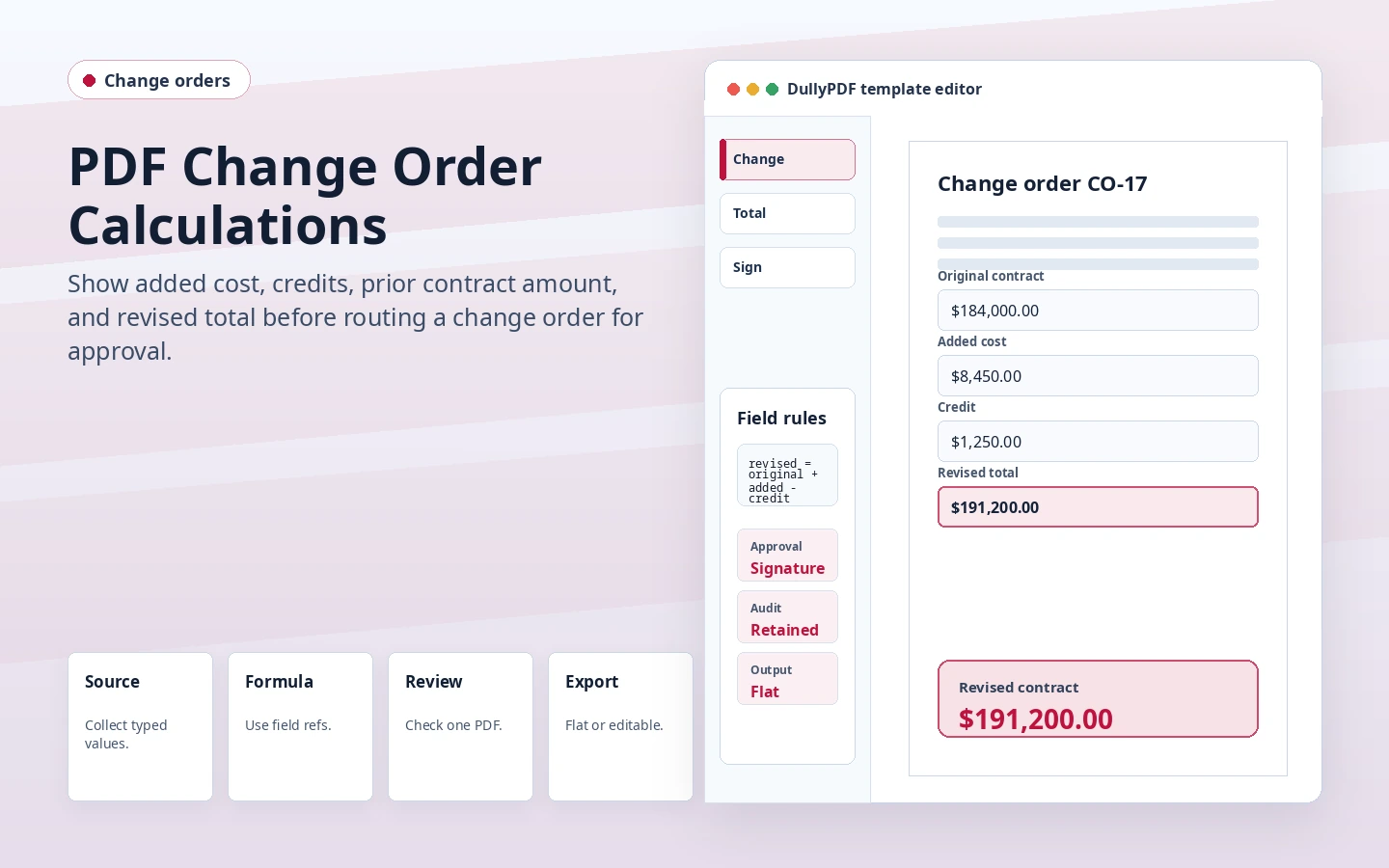
DullyPDF change order calculation preview showing original contract, added cost, credit, and revised total.
Change orders often become approval or signature records, so the final calculated PDF should be frozen after review.
Flat PDF output with final values rendered into the page.
Flat output keeps revised totals stable before customer review or signature.

Change orders need totals that match the visible inputs

A change order may add labor, materials, fees, or time, and it may also include credits or prior payments. The revised total should be derived from those explicit source fields instead of typed manually after the fact.

A calculated PDF template makes that relationship visible. The source values can be reviewed, and the calculated total can be locked as a read-only output.

Use source fields for credits and adjustments

Credits, owner allowances, prior payments, or manual adjustments should each have their own source field. That keeps the revised total explainable and avoids hiding important decisions inside one overwritten total.

The PDF calculation should display the arithmetic, not replace the business approval process around the change order.

Freeze the final version before signature

If the change order is sent for signature, the exact filled PDF should be frozen first. DullyPDF signing workflows use an immutable source artifact so the signer reviews the same calculated record the owner intends to retain.

That is another reason flat output is useful for final change orders: it avoids live viewer behavior changing what the signer or customer sees.

Validate the change order calculations workflow with one real record

A useful change order calculations test starts with one document your team already recognizes, not a perfect demo PDF. Open the existing file, review detection, rename ambiguous fields, confirm checkbox and radio behavior, and save the template only after the field list matches the way the document is used in practice.

Then fill one representative record end to end. Include long names, blank optional values, dates, yes/no choices, and any calculated or scannable fields the page depends on. That single controlled run exposes most template issues before they become repeated output problems.

Choose data and output paths for change order calculations

Search & Fill is the right first path when an operator should pick a record and inspect the result before export. It works with row data from CSV, XLSX, JSON, or stored respondent records. SQL and TXT files should be treated as schema-only mapping inputs; database-backed production workflows should query the database elsewhere and send JSON through API Fill.

Output mode matters too. Editable PDFs are useful when someone will continue working in live fields. Flat PDFs are safer when the completed record goes to customers, employees, agencies, signers, or archive systems because the visible values are baked into the page instead of depending on the recipient PDF viewer.

Production checklist for change order calculations

The change order calculations workflow is ready to reuse when a teammate can clear the document, rerun the same source record, and produce the same visible PDF without remembering hidden cleanup steps. If the result depends on one person knowing which field to fix manually, the template still needs review before it belongs in a repeat workflow.

  • The saved template uses stable field names and reviewed field types.
  • Source headers or API keys match the template schema without ambiguous duplicates.
  • Checkbox, radio, calculated, image, barcode, and signature fields have been tested if the workflow uses them.
  • At least one flat output and one editable output have been opened in the PDF viewers recipients are likely to use.

Why teams use Change Order Calculations

  • Calculate added cost, credits, revised contract amount, and balance due from explicit source fields.
  • Keep final change order totals read-only and derived from visible inputs.
  • Use flat PDFs for customer-facing approvals or signed records.

Implementation signals for Change Order Calculations

  • Change orders can reuse the same calculation model as bids and estimates.
  • Signing workflows can freeze the reviewed flat source PDF before the signer ceremony.
  • Calculated values are materialized before the final PDF is delivered.

Need deeper technical details about change order calculations? Use the Rename + Mapping docs and Search & Fill docs to validate exact behavior.

Frequently asked questions about Change Order Calculations

Can a change order PDF calculate a revised contract total?

Yes. Source fields such as prior amount, added cost, credits, and adjustments can feed a read-only revised total.

Can change orders be signed after calculation?

Yes. The reviewed filled PDF can be frozen for DullyPDF signing workflows after calculated values are materialized.

Does DullyPDF provide contract advice?

No. DullyPDF handles PDF field filling, calculations, and signing workflow mechanics, not legal or contract advice.

Docs for Change Order Calculations

Use these docs pages to verify the exact DullyPDF behavior behind change order calculations before you ship it as a repeat workflow.

Related routes for Change Order Calculations

These adjacent workflow pages cover nearby search intents teams compare while evaluating change order calculations.