Industry workflow page

Field Service PDF Automation for Work Orders, Assets, and Service Totals

Create customizable field service PDF templates with work order barcodes, asset QR codes, labor and parts calculations, technician notes, and customer signoff.

Workflow examples for Field Service PDF Automation

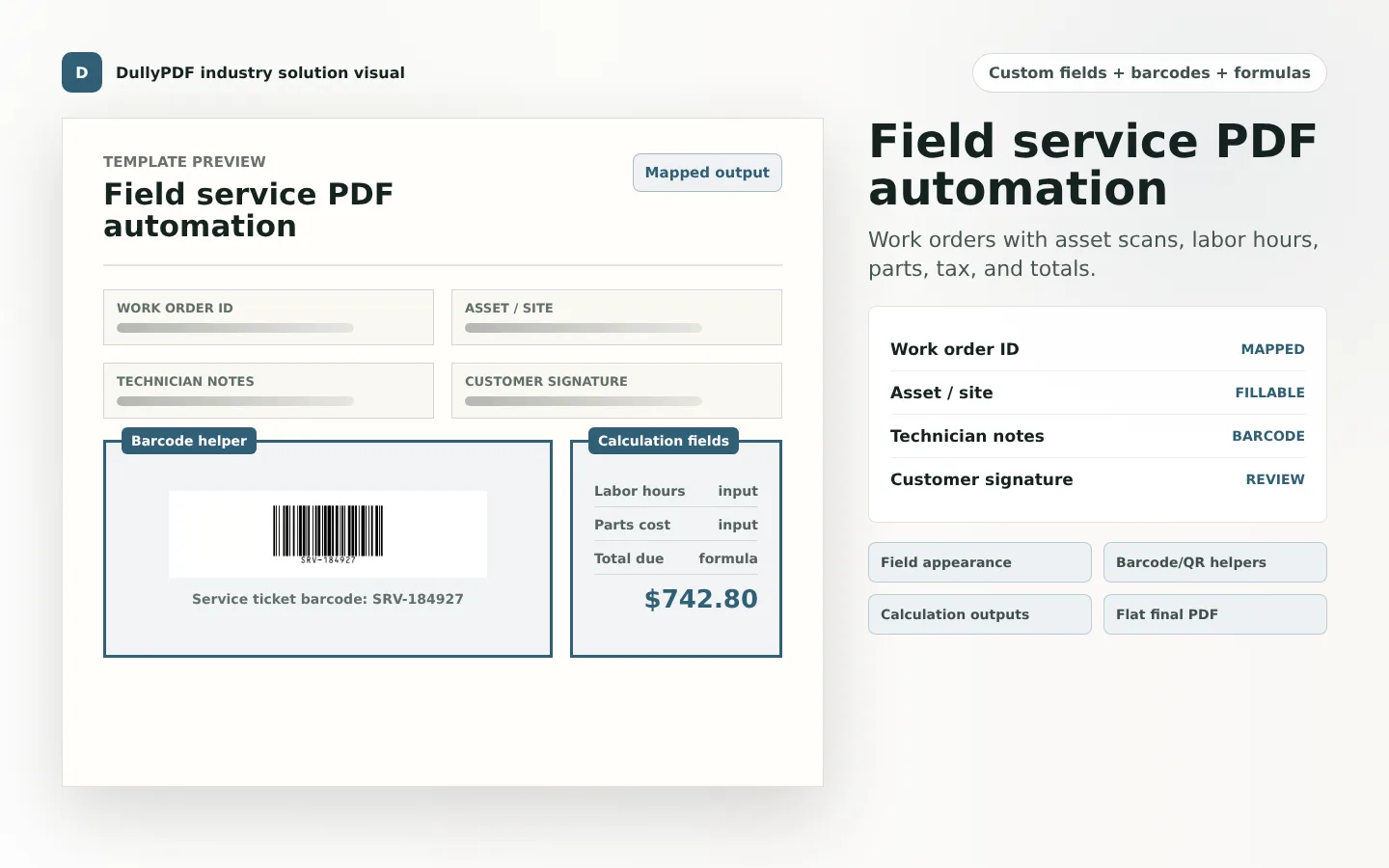
A field service work order PDF preview showing asset barcode, labor and parts fields, and total due calculation.
Field service forms are strong candidates for barcode lookup, technician notes, labor and parts calculations, and final customer signoff.
Filled PDF preview representing a final field service output after mapped work order values have been applied.
A work order barcode or QR code gives the field team a fast route back to the asset, ticket, or service record.

Field service forms mix operational lookup and customer-facing output

A field service work order is both an internal operations record and a customer-facing document. It may need asset details, service site information, technician notes, parts, labor, totals, signatures, and a record lookup path. That mix is why field service PDFs benefit from a more customizable template model.

DullyPDF lets teams keep the existing PDF layout while adding the field metadata, barcode helpers, and calculations needed to generate repeatable service documents.

Work order barcodes and asset QR codes

Use a 1D barcode when the field team scans a short work order or asset ID. Use a QR code when the PDF should open an asset page, customer portal, work order record, or service history. The code should come from the same source field that fills the visible work order details.

That avoids the common problem where a pasted code image no longer matches the work order number printed on the document.

Labor and parts calculations

Field service forms often need labor hours times rate, parts subtotals, trip charges, tax, discounts, deposits, and total due. Those values are easy to mistype when a technician or dispatcher is completing several forms quickly.

Calculation fields let the template own those formulas. Source values can come from Search & Fill, Fill By Link, or API Fill, while DullyPDF computes the derived totals during materialization.

A practical rollout order for service teams

Start with the most common work order PDF. Normalize the fields, add the work order or asset barcode, configure the labor and parts calculations, and export one realistic service record. Only after that should the team publish the form to field staff or connect it to API generation.

For external customer copies, flat PDFs are usually safer because the final values and codes are baked into the page and do not rely on the recipient PDF viewer.

Validate the field service pdf automation rollout with one real record

A useful field service pdf automation test starts with one document your team already recognizes, not a perfect demo PDF. Open the existing file, review detection, rename ambiguous fields, confirm checkbox and radio behavior, and save the template only after the field list matches the way the document is used in practice.

Then fill one representative record end to end. Include long names, blank optional values, dates, yes/no choices, and any calculated or scannable fields the page depends on. That single controlled run exposes most template issues before they become repeated output problems.

Choose data and output paths for field service pdf automation

Search & Fill is the right first path when an operator should pick a record and inspect the result before export. It works with row data from CSV, XLSX, JSON, or stored respondent records. SQL and TXT files should be treated as schema-only mapping inputs; database-backed production workflows should query the database elsewhere and send JSON through API Fill.

Output mode matters too. Editable PDFs are useful when someone will continue working in live fields. Flat PDFs are safer when the completed record goes to customers, employees, agencies, signers, or archive systems because the visible values are baked into the page instead of depending on the recipient PDF viewer.

Production checklist for field service pdf automation

The field service pdf automation rollout is ready to reuse when a teammate can clear the document, rerun the same source record, and produce the same visible PDF without remembering hidden cleanup steps. If the result depends on one person knowing which field to fix manually, the template still needs review before it belongs in a repeat workflow.

  • The saved template uses stable field names and reviewed field types.
  • Source headers or API keys match the template schema without ambiguous duplicates.
  • Checkbox, radio, calculated, image, barcode, and signature fields have been tested if the workflow uses them.
  • At least one flat output and one editable output have been opened in the PDF viewers recipients are likely to use.

Why teams use Field Service PDF Automation

  • Standardize recurring work orders, service tickets, maintenance forms, and customer signoff PDFs.
  • Use barcodes or QR codes for work order IDs, asset records, service sites, and record lookup URLs.
  • Calculate labor, parts, fees, tax, discounts, and total due before the final service PDF is delivered.

Implementation signals for Field Service PDF Automation

  • SafetyCulture describes work order forms as covering job details, labor, materials, costs, signatures, and shareable PDF output.
  • DullyPDF QR and 1D barcode helpers can render work order IDs or lookup URLs into final PDF page content.
  • Calculation fields reduce manual math for labor and parts totals in fixed-layout service forms.

Need deeper technical details about field service pdf automation? Use the Rename + Mapping docs and Search & Fill docs to validate exact behavior.

Frequently asked questions about Field Service PDF Automation

Can DullyPDF automate field service work order PDFs?

Yes. Field service teams can build reusable work order templates with custom fields, barcodes, QR codes, calculations, and customer signoff sections.

Can a service PDF include an asset QR code?

Yes. QR helper fields can encode an asset URL, service record URL, or lookup token from a mapped source field.

Can DullyPDF calculate labor and parts totals?

Yes. Calculation fields can compute labor, parts, fees, tax, discounts, and totals from source number inputs.

Legal footnotes and sources for Field Service PDF Automation

  1. 1.SafetyCulture | Work order form guidance and PDF report output

Docs for Field Service PDF Automation

Use these docs pages to verify the exact DullyPDF behavior behind field service pdf automation before you ship it as a repeat workflow.

Related routes for Field Service PDF Automation

These adjacent routes cover neighboring document workflows and team use cases that usually get evaluated alongside field service pdf automation.