
Why teams use Fill Information in PDF
- Turn manual copy/paste workflows into reusable mapped templates.
- Fill name, date, checkbox, and text fields from structured rows.
- Validate output with deterministic search and fill guardrails.
Commercial workflow page
If you need to fill information in PDF forms repeatedly, DullyPDF helps you map once and populate forms from searchable records.
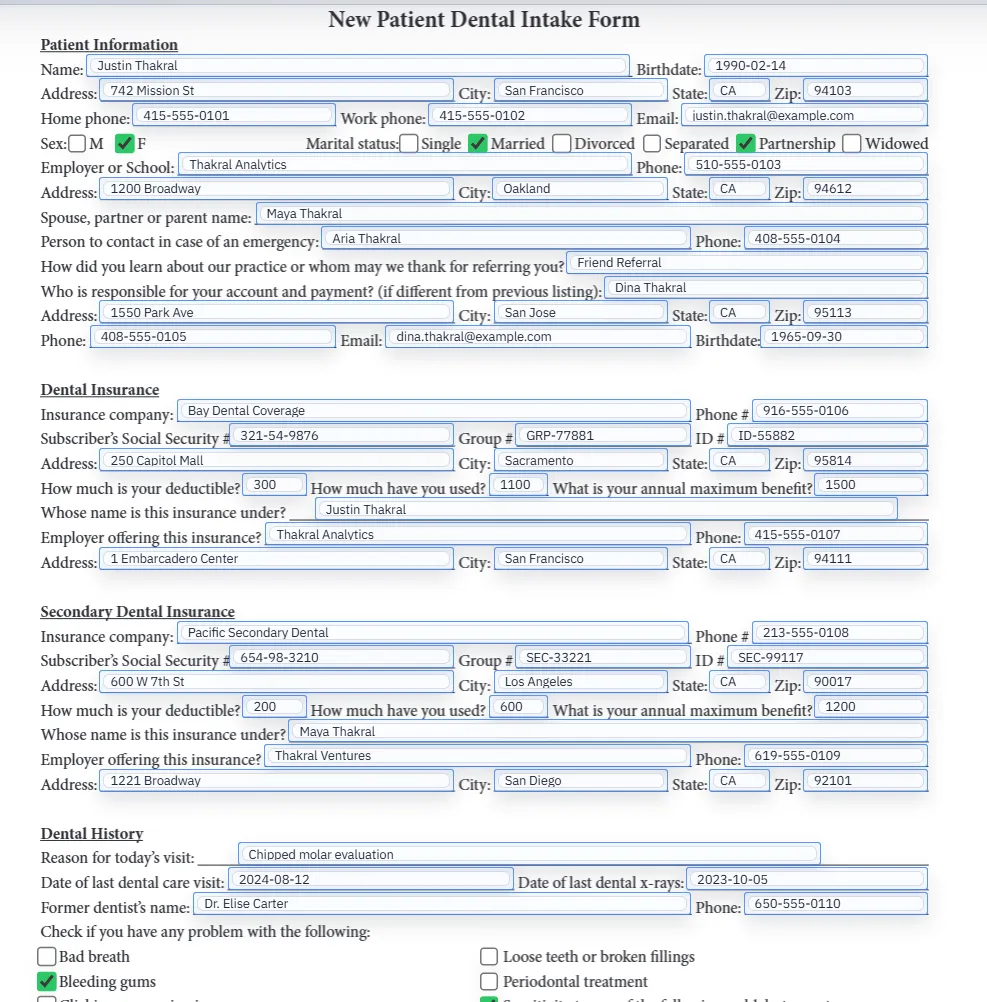
In most business workflows, filling information in a PDF does not mean typing into a single document once. It means reusing the same document layout over and over again with new record data. Client details, patient demographics, employee onboarding data, policy information, or application fields all need to land in the right place repeatedly.
That is why DullyPDF focuses on mapped templates instead of one-off document editing. The durable value comes from setting the form up once, then letting structured records drive the output each time the workflow repeats.
Manual PDF filling is slow mostly because the operator has to translate data mentally while moving between systems. They are not just typing. They are matching names, dates, checkbox meanings, and repeated sections of the same form. A mapped template removes that translation work and replaces it with reusable field-to-data relationships.
Once the template is saved, the operator can search a record, fill the document, inspect the result, and move on. That is a fundamentally different workflow from opening a PDF and typing through every field again from scratch.
Some teams fill from internal spreadsheets or JSON exports. Others collect the information from respondents first. DullyPDF supports both patterns because the final fill step still depends on structured records. Search & Fill can work with CSV, XLSX, JSON, or stored Fill By Link responses without changing the underlying template logic.
That shared workflow matters because it keeps the PDF template stable even as the source of the record changes. The same document can serve staff-driven filling and respondent-driven collection without creating multiple disconnected versions of the form.
The strongest PDF filling workflows usually start from one of three data-source patterns. Internal operations teams often work from CSV, XLSX, or JSON exports. Respondent-driven teams collect the row first through Fill By Link. Product or engineering teams may eventually publish an API endpoint after the template is already stable. Each pattern can fill the same saved template, but each enters the workflow at a different stage.
That is why this page stays broader than the spreadsheet, Fill By Link, or API routes. The underlying job is to fill information into a recurring PDF reliably. The neighboring pages exist to explain which data-source pattern is the best fit once that broader need is clear.
Text fields are often the easiest part of PDF filling. Dates, checkbox groups, repeated labels, and option-style fields are where workflows usually become unreliable first. Those fields require the template to interpret meaning, not just carry a value from one system into another.
That is why field QA matters. A document can look mostly correct while still hiding weak checkbox rules, ambiguous date formatting, or duplicate names that only break when real records are tested. The template is ready only when those risky field types behave predictably under representative data.
A dependable PDF filling workflow is usually the result of a short checklist repeated consistently. Confirm that every required field exists, test one realistic record with long values and non-empty dates, inspect checkbox behavior, clear the document, and fill it again. If the second pass still behaves cleanly, the template is much closer to being reusable.
That QA loop matters more than feature count. Teams do not need a dramatic automation claim. They need a workflow they can trust the next time the same document comes back across their desk.
Need deeper technical details about fill information in pdf? Use the Rename + Mapping docs and Search & Fill docs to validate exact behavior.
Yes. DullyPDF is designed for repeated intake and form workflows where data comes from structured records.
No. Once saved, templates retain mapping metadata so you can run repeat fills with less setup.
Yes. Checkbox metadata and rule precedence are part of the mapping and fill workflow.
Yes. DullyPDF Fill By Link lets the template owner collect respondent answers first, then select that respondent inside the workspace when generating the PDF.
These walkthroughs and comparison posts cover the same workflow cluster from an operator point of view, which helps you move from a route summary into a more specific implementation path.
Use these docs pages to verify the exact DullyPDF behavior behind fill information in pdf before you ship it as a repeat workflow.
These adjacent workflow pages cover nearby search intents teams compare while evaluating fill information in pdf.