
Why teams use PDF to Database Template
- Map detected fields to CSV, XLSX, JSON, SQL, or application schema headers.
- Use OpenAI rename + mapping for faster standardization.
- Keep checkbox groups and option keys aligned to data columns.
Commercial workflow page
Standardize field names, align them to schema headers, and build repeatable PDF-to-database templates for intake operations.
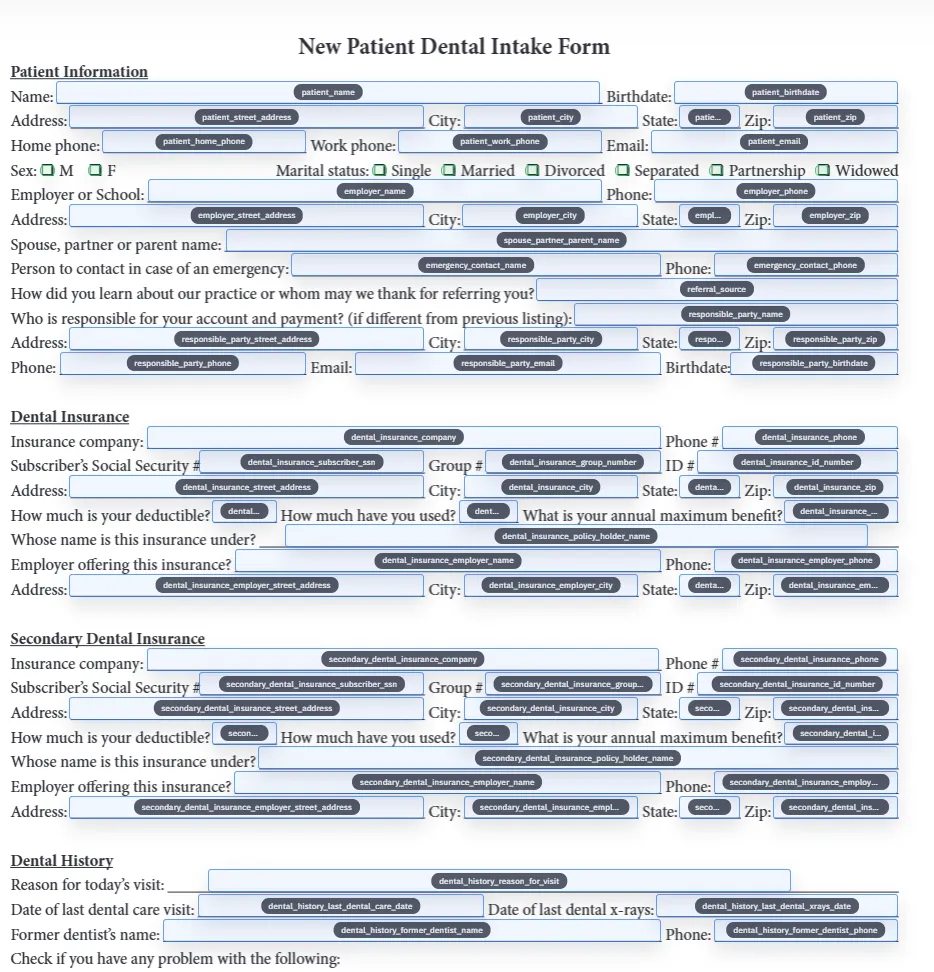
A normal fillable PDF can still be a dead end if the field names do not line up with your real data. A PDF to database template is different because it explicitly connects the PDF field set to the column structure you already use in CSV exports, spreadsheets, JSON records, or application data. That mapping step is what turns a PDF from a visual form into a repeatable data-entry workflow.
This matters most when teams are handling the same document type over and over again. If the PDF fields are mapped to a stable schema, one record can fill predictably today and another record can fill predictably next month even after staff changes. The template becomes an operational asset instead of a fragile manual process that depends on whoever happens to know the form best.
Many PDFs start with weak field identifiers such as generic labels, repeated names, or values inherited from older authoring tools. Mapping directly from those names to a database schema can work on simple forms, but it tends to break down on longer packets and checkbox-heavy documents. Rename improves the odds by turning vague field names into clearer template metadata before the mapping pass runs.
DullyPDF supports rename-only, map-only, and combined Rename + Map workflows. In practice, combined workflows are useful when the source document is visually clear but the field names are weak. You get more meaningful names, better schema alignment, and less manual cleanup in the editor afterward.
Database mapping gets harder when the source form uses checkbox groups, yes-no pairs, list-style selections, or option-driven logic. Those cases cannot be treated like plain text boxes. They need group keys, option keys, and clear rule types so the fill step knows whether the incoming value should behave like a boolean, enum, presence signal, or multi-select list.
That is why DullyPDF treats checkbox handling as part of the template definition rather than an afterthought. When the checkbox metadata is configured well, mapped fills become much more stable. When it is not, teams end up with half-working templates where the text is right but the selected options drift or fail silently.
A good PDF to database template should survive routine operational changes. New columns appear, naming conventions tighten, and forms get revised. The safest maintenance pattern is to keep the template as the canonical document setup, then reopen it when your schema changes, adjust the field map, test with a representative row, and save the updated version. That keeps history anchored to one known template instead of proliferating near-duplicates.
If a team is supporting multiple recurring forms, the discipline is the same: decide which form is canonical, keep the schema naming conventions tight, and make the smallest possible correction when the business process changes. Consolidation is usually better than cloning lightly different versions for every minor variation.
This page should rank for the commercial task of turning a PDF into a mapped template. The Rename + Mapping docs are narrower: they explain the runtime behavior, confidence review, checkbox rules, and operator sequence once you are already inside DullyPDF. API Fill is different again because it assumes the mapped template already exists and the next step is publishing a hosted endpoint, not teaching a person how to align fields to columns.
That separation matters for SEO and for users. Someone searching for a PDF to database template usually needs the workflow shape and the decision criteria first. Someone already implementing the template needs the docs. Someone integrating another system needs the API page. Keeping those routes distinct reduces query overlap and makes the internal-link path clearer.
Need deeper technical details about pdf to database template? Use the Rename + Mapping docs and Search & Fill docs to validate exact behavior.
A database template is explicitly mapped to data headers so rows can be filled predictably instead of manually.
Yes. DullyPDF supports checkbox grouping metadata and rule-based mapping for boolean, enum, and list-style values.
Yes. Saved templates can be reopened, remapped, and retested as your schema evolves.
These walkthroughs and comparison posts cover the same workflow cluster from an operator point of view, which helps you move from a route summary into a more specific implementation path.
Use these docs pages to verify the exact DullyPDF behavior behind pdf to database template before you ship it as a repeat workflow.
These adjacent workflow pages cover nearby search intents teams compare while evaluating pdf to database template.