Commercial workflow page

How Editable PDF Field Appearance Works

Learn how AcroForm /DA, /DR, /AP, and /V keep field values, fonts, sizes, and colors inside editable PDF widgets after export.

Workflow examples for AcroForm Field Appearance

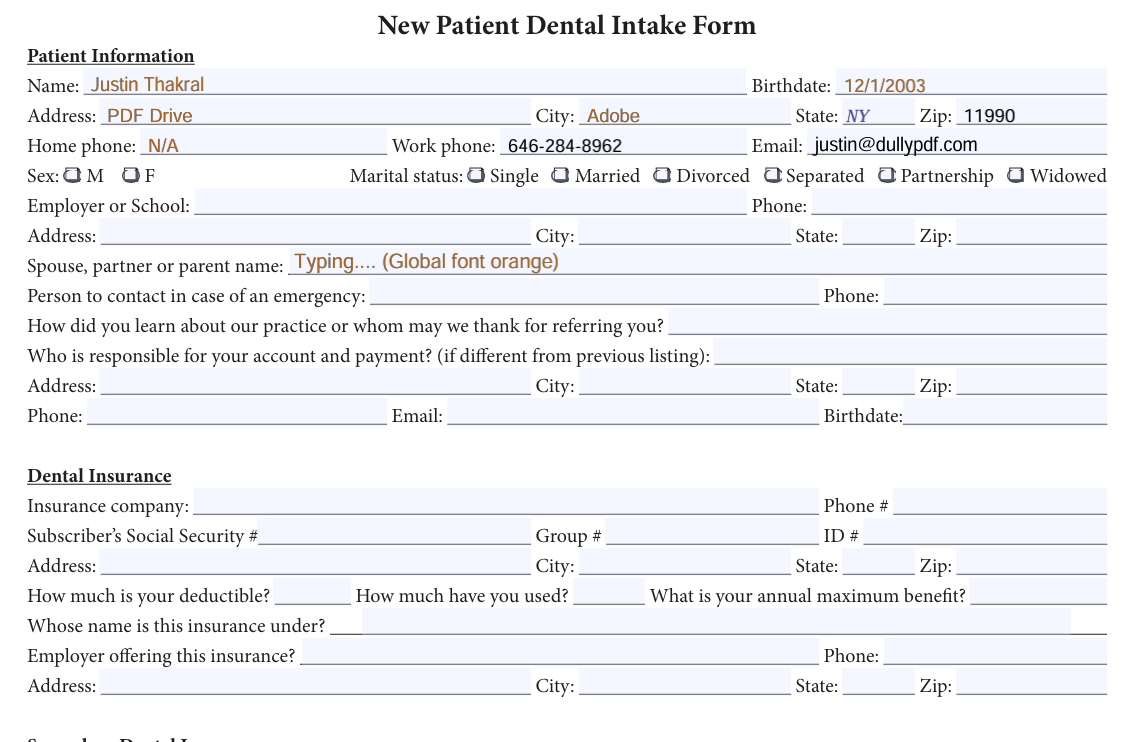
Editable PDF export with the selected AcroForm field active and typed text rendered in the global orange field appearance.
Editable output is trustworthy when values live inside AcroForm fields. This viewer state shows typed field text using the selected font color and size while the field is active.
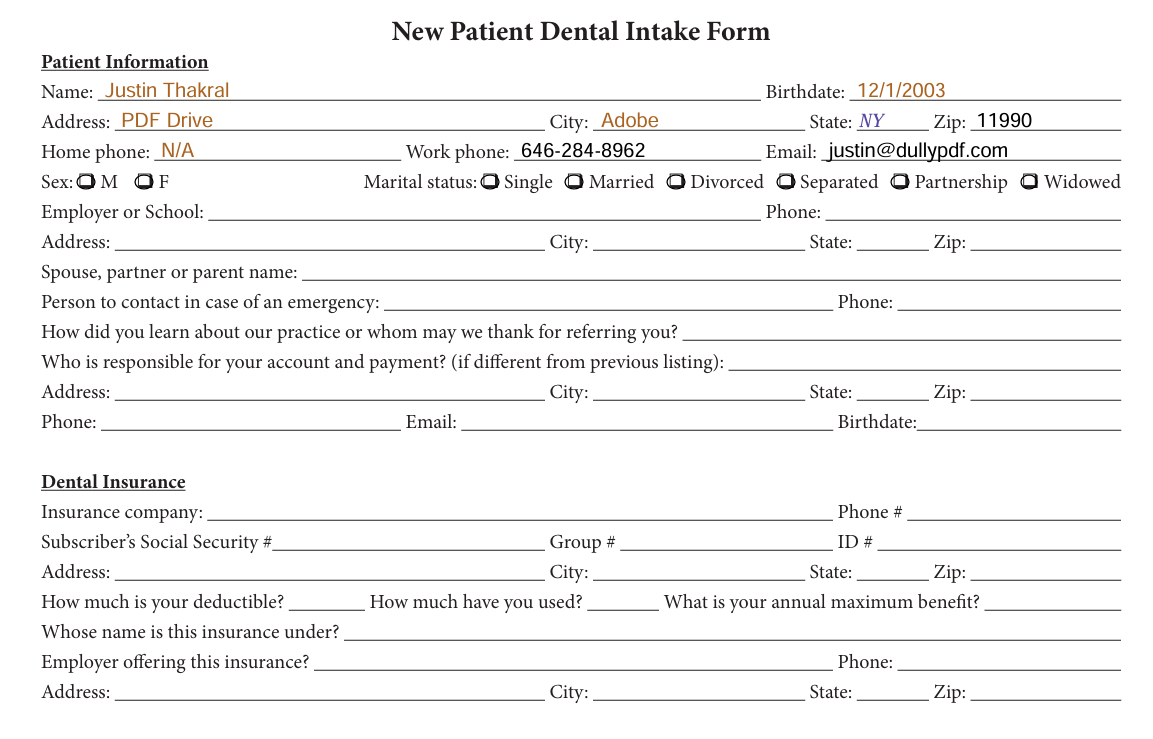
Flat PDF export with colored field values drawn into the dental intake form page content.
Flat output is a separate export mode: it intentionally draws the final values into page content and removes the need for live widget appearances.
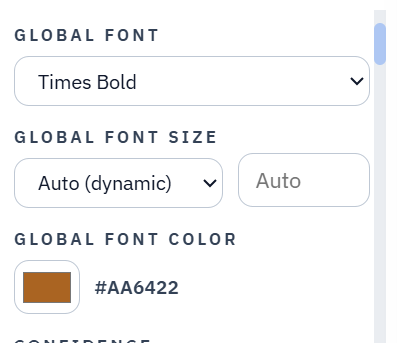
Global field appearance panel showing Times Bold, Auto dynamic font size, and orange field color controls.
Global appearance settings become the inherited template intent that DullyPDF maps into AcroForm appearance data during editable export.
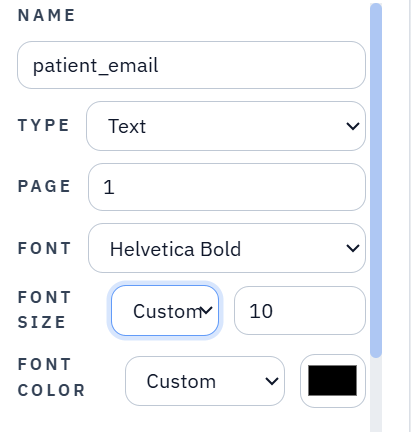
Individual field inspector showing Helvetica Bold, custom size 10, and black color overriding the global appearance.
Per-field overrides are stored with the field metadata so one widget can write a different /DA font, size, or color from the global default.

An editable PDF needs data and appearance

A fillable PDF is not just a visual page with rectangles on top. The PDF catalog owns an /AcroForm, the form owns logical field dictionaries, pages own widget annotations, and widgets can own appearance streams that describe how the filled value should look.

That split matters because the user-visible text and the editable field value are not the same thing. If an exporter only draws text onto the page while leaving an empty widget above it, the PDF can look filled but behave like an empty form when someone clicks, edits, submits, or imports it later.

/V is the field value; page text is not

For text-like editable output, the current value belongs in the field dictionary as /V, with /DV used when the generated file should also treat that value as the default reset state. That is what lets a downloaded editable PDF reopen with the text inside the actual field.

Flat output is different. A flat PDF should draw the final value into page content and remove interactive widgets. Mixing those models creates duplicated or stale values, so DullyPDF keeps editable output and flat output as separate export paths.

/DA tells viewers which font, size, and color to use

Variable text fields use a default appearance string, usually called /DA, to describe the font resource, point size, and text color. A typical value looks like /Helv 10 Tf 0 0 0 rg: use the Helv font resource at 10 points with RGB black text.

DullyPDF writes selected fonts, Auto or custom font sizes, and global or field-specific colors into appearance data so editable fields can display both active typed text and the final committed value with the intended style instead of falling back to a generic viewer default.

/DR registers the fonts that /DA references

The font name inside /DA is a resource alias. It only works reliably when the corresponding font resource exists in the document-level /AcroForm /DR /Font dictionary or in field/widget resources. DullyPDF registers the selected text-safe Base 14 font resources so appearance strings and widget appearances can resolve them.

DullyPDF uses short AcroForm-style aliases such as /Helv, /Time, /TiIt, and /CoBo while the underlying /BaseFont remains Helvetica, Times, or Courier. This keeps generated files closer to common AcroForm conventions.

/AP makes the completed widget draw correctly

A widget appearance stream is a small PDF drawing program attached to a form widget. For text fields, the normal appearance draws the current value with the chosen font, size, and color. For checkboxes and radio buttons, the normal appearance usually contains state names such as /Off and the selected export value.

An appearance stream is still part of the field. It is not the same as flattening. Editable PDFs can and should include widget-owned /AP data when that helps viewers show the completed form immediately after download.

What DullyPDF preserves across templates and generated outputs

DullyPDF saves normalized appearance intent with the template field metadata and writes the corresponding PDF keys during materialization. Global editor settings provide the inherited default, and the individual field inspector can override that default for a specific widget. That is why fonts, font sizes, and field colors can persist through save, reopen, Fill By Link, API Fill, editable download, and flat download.

Generated editable PDFs also carry compact DullyPDF appearance metadata so re-uploading one of those files can restore global color and field-specific color overrides in the inspector rather than treating every color as an unrelated PDF default.

What PDF viewers can still vary

Viewers have latitude while a user is actively focused inside a field. Adobe, Chrome, Preview, and browser PDF engines can differ in how much of the live typing state they source from /DA before the value is committed. That does not change where DullyPDF stores the chosen appearance: field values stay in /V, appearance lives in /DA and widget /AP, and flat exports bake the final visible state into page content.

The practical QA check is to inspect both editable and flat outputs. Editable output should keep values inside fields and show the selected appearance when the field is not being actively edited. Flat output should have no live widgets and should visually match the selected fonts, sizes, and colors.

Why teams use AcroForm Field Appearance

  • Understand the difference between editable field values and flat page text.
  • See why /DA, /DR, and /AP must agree for stable fonts, sizes, and colors.
  • Use the same mental model to evaluate editable downloads, flat downloads, Fill By Link, and API Fill outputs.

Implementation signals for AcroForm Field Appearance

  • Editable exports store text-like values in /V and /DV so values stay inside the fillable field.
  • Field appearance strings store selected font resource names, point sizes, and RGB colors.
  • Selected text field color and size can apply while the exported field is focused for typing, not only after focus leaves the field.
  • Widget-owned /AP streams show completed values immediately without adding a separate page-content text layer.
  • Flat exports intentionally bake values into page content and remove live widgets.

Need deeper technical details about acroform field appearance? Use the Rename + Mapping docs and Search & Fill docs to validate exact behavior.

Frequently asked questions about AcroForm Field Appearance

What is /DA in a fillable PDF field?

/DA is the default appearance string for variable text fields. It references a font resource, point size, and text color.

What is /AP in a PDF widget?

/AP is the appearance dictionary for a widget annotation. Its normal appearance can draw the current field value or the selected checkbox/radio state.

Why should editable exports not draw a separate flat text layer under fields?

That creates a PDF that looks filled but has a different live field value above the drawn text. Editable exports should put the value and appearance into the AcroForm field itself.

How do font colors stay with saved templates?

DullyPDF saves normalized appearance metadata with the template and writes the selected color into field/root appearance strings and widget appearances when generating PDFs.

Guides for AcroForm Field Appearance

These walkthroughs and comparison posts cover the same workflow cluster from an operator point of view, which helps you move from a route summary into a more specific implementation path.

Docs for AcroForm Field Appearance

Use these docs pages to verify the exact DullyPDF behavior behind acroform field appearance before you ship it as a repeat workflow.

Related routes for AcroForm Field Appearance

These adjacent workflow pages cover nearby search intents teams compare while evaluating acroform field appearance.