
Why teams use PDF to Fillable Form
- Convert scanned or native PDFs into editable fillable templates.
- Review field candidates with confidence scoring before finalizing.
- Use visual tools to resize, rename, and type fields with precision.
Commercial workflow page
Upload a raw PDF, detect candidate fields, clean geometry in the editor, and save a reusable fillable template for repeat workflows.
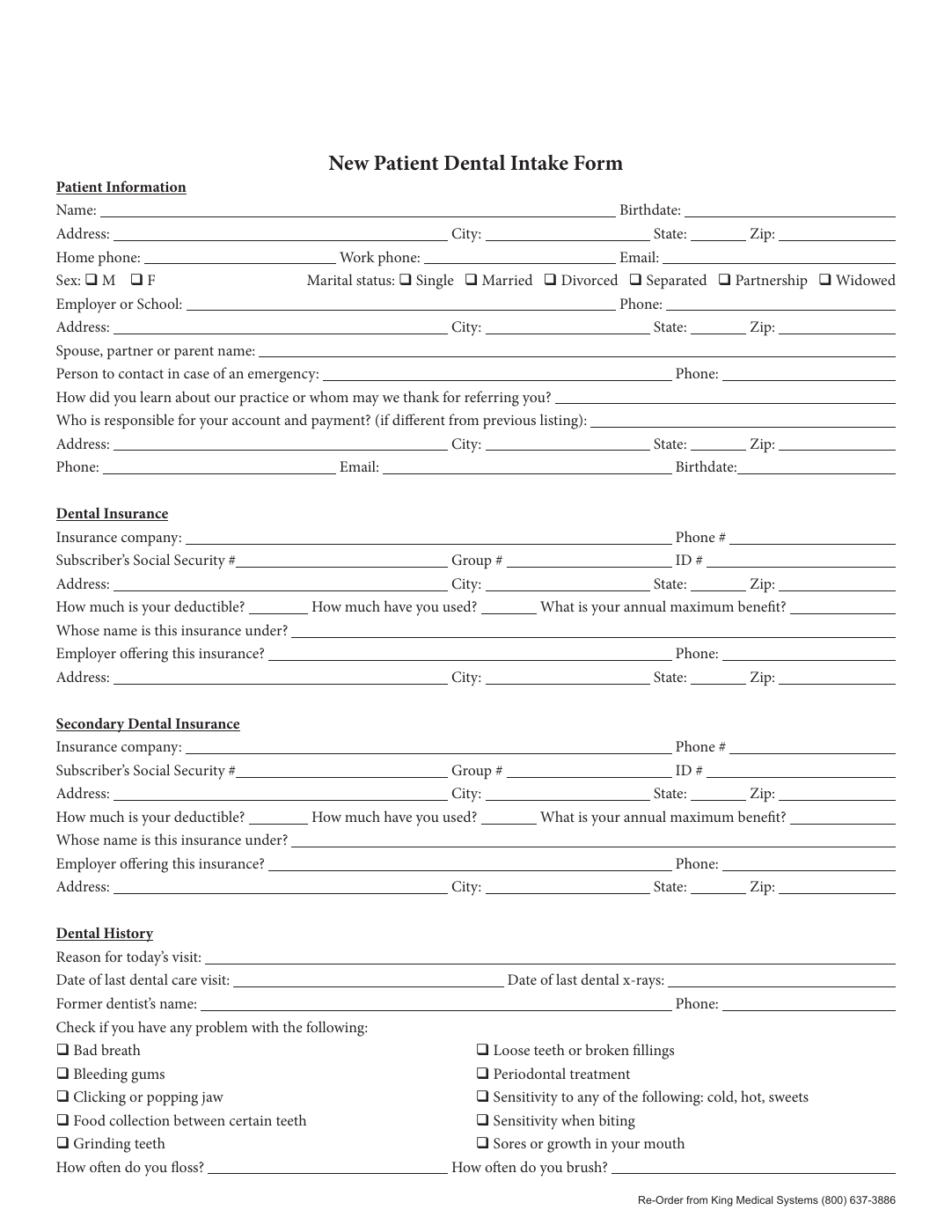
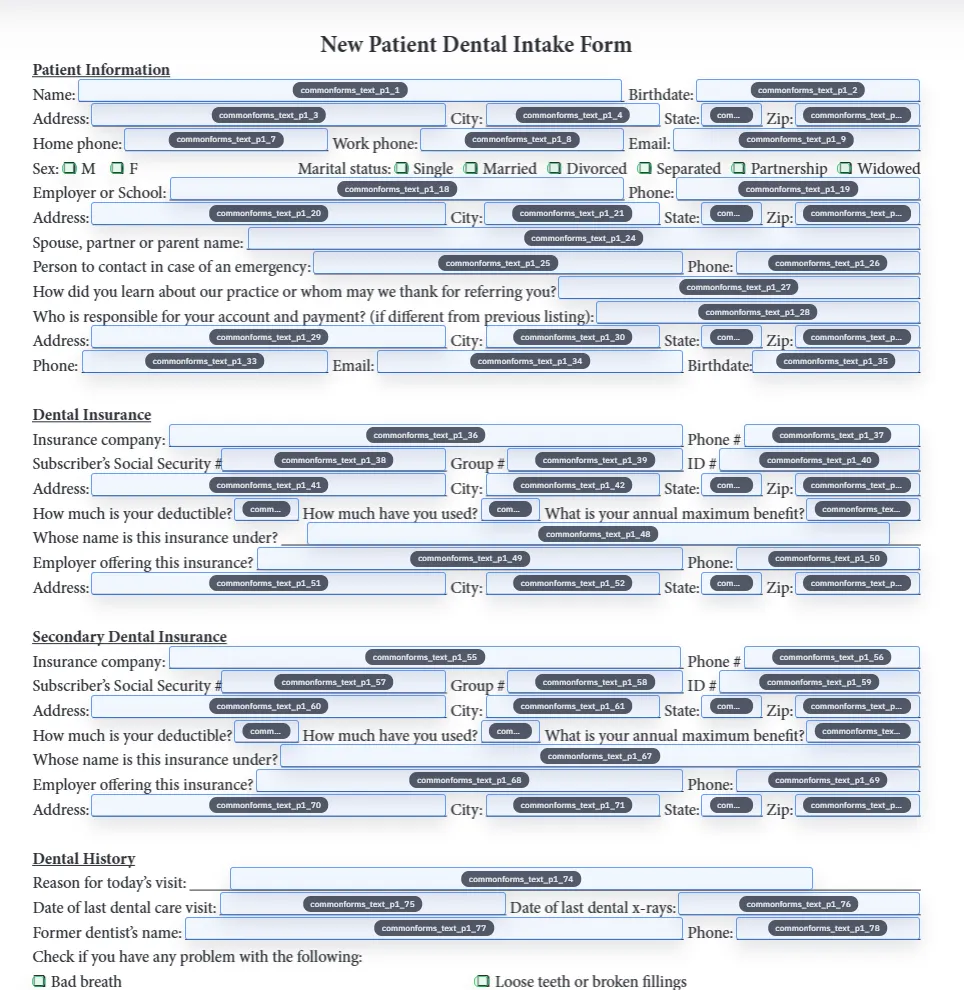
Focused demo
This narrower walkthrough stays on the core conversion path: upload a PDF, detect fields automatically, clean the template in-browser, and save a reusable fillable form.
Use this shorter demo when you care about converting one existing PDF into a dependable template before you expand into broader fill workflows.
Most teams looking for a PDF to fillable form tool are not trying to design a brand-new form from scratch. They already have an intake packet, insurance form, permit, onboarding document, or client worksheet that exists as a PDF and needs to become reusable. The real problem is turning that fixed layout into something you can review, map, save, and fill again later without rebuilding it every time.
That is where DullyPDF is narrower than a general PDF editor and more useful for repeat operations. It is built for existing PDFs that need field detection, cleanup, naming, mapping, and repeat filling. If you need full document authoring or page redesign, use a general editor. If you need to convert the same document type into a reusable workflow, the template approach is the better fit.
The workflow starts with upload and detection. DullyPDF renders each page, runs the CommonForms detector, and proposes candidate text, checkbox, date, and signature fields. Instead of blindly trusting the model output, you review the results in the editor with confidence cues and geometry controls so the field set becomes clean before anyone relies on it downstream.
Once the field geometry is stable, you can rename fields, map them to schema headers, and save the result as a reusable template. That matters because the real value is not simply making a PDF fillable once. The value is creating a versioned, reopenable template that can support repeat Search & Fill runs, QA loops, saved-form reuse, and later updates when the source form changes.
A usable template is more than a set of boxes on a page. Reliable production output depends on stable field names, predictable field types, and enough QA that teams trust the result. Text fields need names that make sense to humans and to mapping logic. Checkboxes need correct grouping and option keys. Date fields need consistent normalization. If those details are weak, the document may technically be fillable while still failing as an operational workflow.
The practical standard is simple: test one real record end to end before rolling the template out to a team. Open the saved template, fill it from representative data, inspect the output, clear the fields, and run the fill again. That loop catches most issues early and keeps the template from becoming a fragile one-time conversion that nobody wants to reuse.
Detection is fastest when the PDF is clean, high contrast, and visually consistent. Native PDFs with obvious form lines usually need less cleanup. Scanned forms, dense table layouts, decorative borders, and tightly packed checkbox groups usually need more review. That is normal. The goal is not zero manual input. The goal is moving the operator from full manual field creation to targeted cleanup of a mostly-correct draft.
A strong review order is to start with low-confidence items, then scan for duplicated labels, misclassified checkboxes, and fields that are slightly shifted relative to the printed form line. If a detector misses something important, the editor still lets you add or correct fields manually. The combination of detection plus human cleanup is what makes the template dependable.
A flat native PDF with clear lines usually moves through detection faster than a skewed scan or a noisy legacy document. Scanned packets tend to need more geometry cleanup because line quality, contrast, and spacing are less predictable. Already-fillable PDFs may still need review too, especially when the embedded field set is incomplete, poorly named, or out of sync with the real operational workflow.
That is why conversion should not be judged by whether the file technically opens in a PDF tool. The better standard is whether the saved template is clean enough to support repeat filling without hidden geometry problems or naming drift.
Before you save the converted template, confirm that every required field exists, low-confidence detections have been reviewed, dates and checkbox groups are named clearly, and one representative record fills correctly end to end. That checklist is what separates a reusable template from a one-time draft that happens to look finished on screen.
A short checklist is especially important when more than one person will rely on the template later. The goal is not just to make the PDF fillable. It is to make the workflow dependable enough that someone else can reopen the template and trust what happens next.
A one-time conversion may be enough if the document will never appear again. Most teams landing on this page do not have that problem. They have a recurring form, packet, or certificate that comes back every week or every month with different data.
That is where the reusable template model wins. It preserves the cleanup work, the naming work, and the mapping work so the next fill starts from a stable baseline instead of another ad hoc conversion. That difference is what keeps this page distinct from lightweight “make this PDF editable” tools or quick-fix blog tutorials.
Need deeper technical details about pdf to fillable form? Use the Rename + Mapping docs and Search & Fill docs to validate exact behavior.
Yes. DullyPDF detects likely field regions, then lets you refine and save them as a fillable template.
No. You edit overlay field metadata and geometry in the app, without changing the source PDF layout.
Yes. Saved forms preserve PDF bytes and field metadata so you can reopen and refill without rerunning full setup.
These walkthroughs and comparison posts cover the same workflow cluster from an operator point of view, which helps you move from a route summary into a more specific implementation path.
Use these docs pages to verify the exact DullyPDF behavior behind pdf to fillable form before you ship it as a repeat workflow.
These adjacent workflow pages cover nearby search intents teams compare while evaluating pdf to fillable form.