Commercial workflow page

Style Fillable PDF Fonts, Sizes, and Colors

Set global or per-field fonts, sizes, and colors for fillable PDF text/date fields, then save templates that preserve them in exports.

Workflow examples for Fillable PDF Fonts and Colors

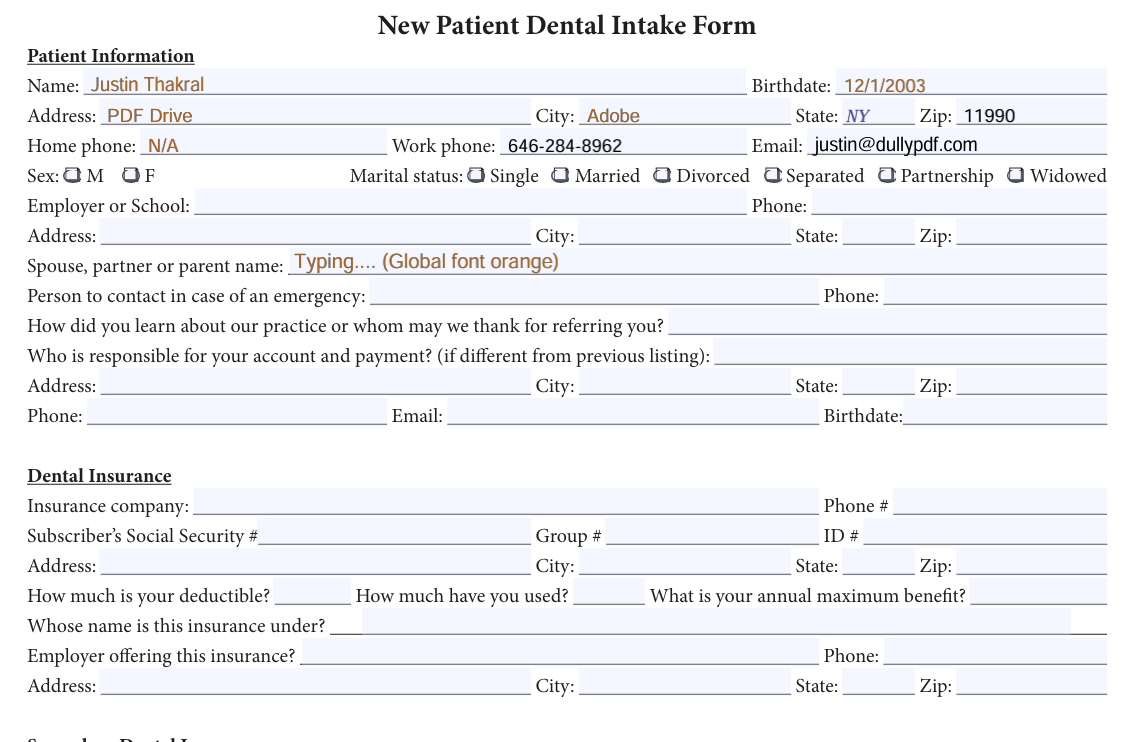
Flat PDF export of a dental intake form with filled values baked into the page in multiple field colors.
Flat downloads bake the final field values directly into the PDF page content, so the chosen colors render even after the fields are no longer editable.
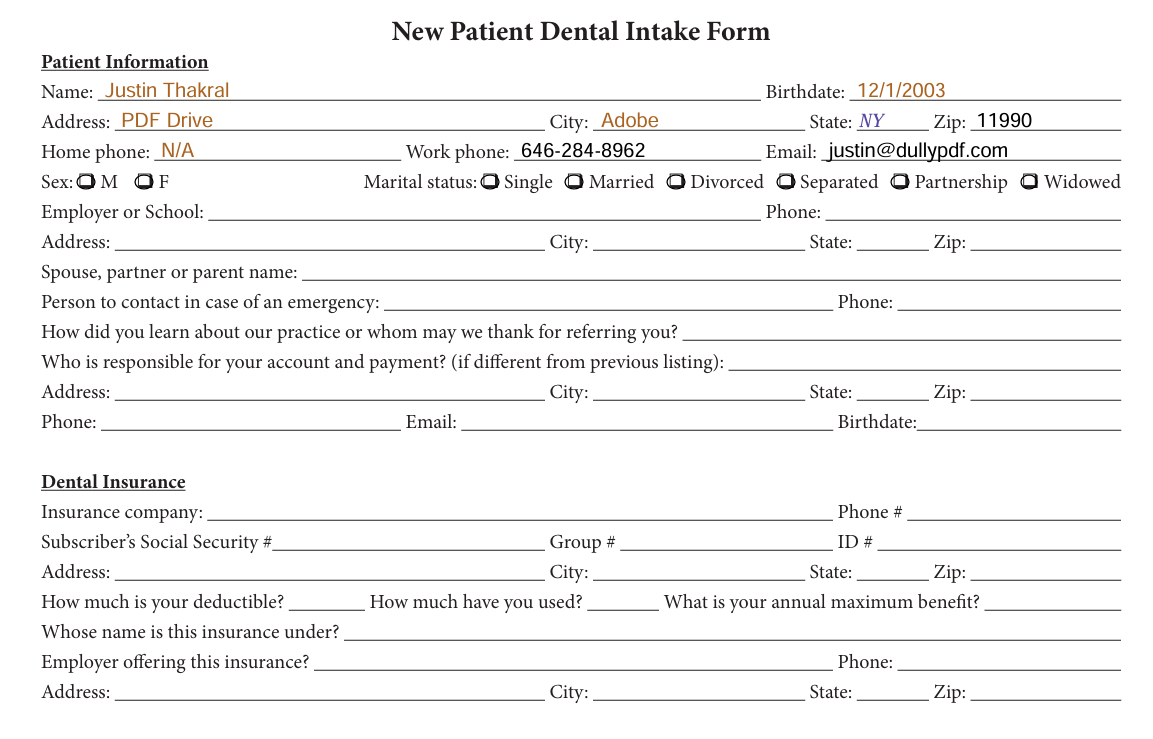
Editable PDF export showing live AcroForm fields with colored values and an active typed value using the global orange field appearance.
Editable downloads keep text inside the AcroForm fields. When the user types into a selected field, the selected font color and size are applied to the active editing state as well as the committed value.
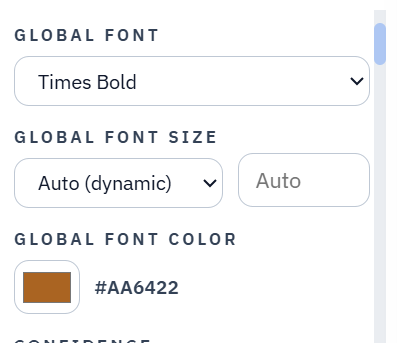
DullyPDF left field panel global font controls set to Times Bold, Auto dynamic size, and an orange global field color.
The left field panel sets the global default: Times Bold, Auto dynamic font size, and a shared orange field color for fields that inherit appearance.
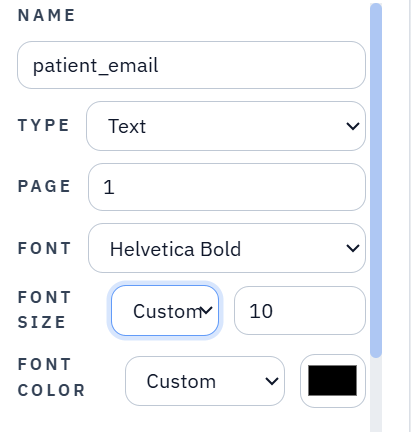
DullyPDF field inspector showing one field overriding the global style with Helvetica Bold, custom size 10, and black text.
The field inspector handles exceptions. A specific field can override the global font, font size, and color while the rest of the template continues to inherit the shared settings.

Why field appearance matters on reusable PDF templates

A fillable PDF template is easier to trust when the generated fields look like part of the original document. Font family, point size, and color all affect that trust. A certificate, intake form, permit, or internal worksheet can technically be filled while still looking wrong if typed values are too large, too small, or visually disconnected from the rest of the form.

DullyPDF treats those choices as template appearance settings, not as one-time preview tweaks. The operator can choose a global field appearance for the workspace and then override individual text or date fields when a specific field needs a different font, size, or color.

Global appearance gives teams a stable default

The left field panel gives operators a global starting point for text and date fields. The global editor can set the shared font family, keep font size on Auto dynamic sizing, and choose one field color that inherited fields reuse across preview and export.

That global layer keeps setup fast. Most recurring forms only need one appearance rule, so teams can avoid setting every field manually while still producing editable and flat downloads that match the chosen template style.

  • Use Default (Helvetica) when the template should behave like previous DullyPDF exports.
  • Use Auto font size when field height should drive the rendered text size.
  • Use global font color when most fields should share the same visible text color.

Field-specific overrides handle the exceptions

Some PDFs need targeted exceptions. A narrow ID field may need a smaller point size, a highlighted total may need a specific color, or a section heading may need a bold font from the supported Base 14 set. The field inspector lets text and date fields inherit the workspace appearance or store their own override for font, font size, and color.

Those overrides travel with the field metadata. They are used in the live fill preview, saved templates, editable PDF downloads, flat PDF downloads, Fill By Link materialization, and API Fill materialization.

Saved templates keep field colors on fillable forms

The important product behavior is persistence. When a user saves a DullyPDF template, the selected font, font size behavior, and font color choices are saved with the field definitions. Reopening the template should not collapse custom colors back to black or forget which fields intentionally inherit the global color.

The same rule applies after publication. A saved template used for Fill By Link or API Fill keeps the selected field colors when DullyPDF generates a fillable form output from respondent answers or JSON data.

Editable and flat exports use the same appearance intent

Editable exports keep the value inside the AcroForm field and attach widget appearance data so the completed value is visible when the PDF opens. The editable export should also apply the selected font color and size while the user is typing in the selected field, then keep the same appearance once the field is committed.

Flat exports remove interactivity and draw the final value into the page content. Those output modes are different, but they should both respect the same saved font, size, and color decisions.

That distinction prevents the bug where a PDF shows text on the page but the actual editable field remains empty or uses a stale default appearance. DullyPDF avoids that by treating editable output as real field data plus field appearance, not a flat drawing with an empty widget layered on top.

PDF viewers may still control the live focused editing state

PDF viewers are not completely uniform while a user is actively typing inside an exported field, so focused font-family behavior can still vary by viewer. DullyPDF writes the field appearance so selected color and size apply to the editable typing state where supported, and the committed value, printed output, and flat output follow the selected DullyPDF appearance.

For normal text and date fields, DullyPDF uses the text-safe Helvetica, Times, and Courier Base 14 families because those fonts can be referenced without embedding external font programs. Symbol-only Base 14 fonts are intentionally excluded from typed field controls because normal user text does not map reliably to those encodings across common viewers.

Why teams use Fillable PDF Fonts and Colors

  • Set one workspace default for fillable text and date fields, then override individual fields when the template needs exceptions.
  • Choose from the text-safe Helvetica, Times, and Courier Base 14 font families without uploading custom font files.
  • Use Auto font sizing or custom point sizes, then pair those choices with global or per-field text colors.

Implementation signals for Fillable PDF Fonts and Colors

  • Saved templates keep selected fonts, font sizes, and field colors when reopened later.
  • Editable PDF exports place values and appearance inside AcroForm fields, including the selected font color and size while a field is actively being typed into.
  • Flat PDF exports bake the same chosen fonts, sizes, and colors into the final non-editable page content.
  • Fill By Link and API Fill outputs reuse the saved template appearance snapshot, so respondent and API-generated files keep the same field colors.

Need deeper technical details about fillable pdf fonts and colors? Use the Rename + Mapping docs and Search & Fill docs to validate exact behavior.

Frequently asked questions about Fillable PDF Fonts and Colors

Can DullyPDF change fonts in fillable PDF fields?

Yes. Text and date fields can use a global font or a field-specific font from the supported text-safe Base 14 font families.

Can I set font colors on fillable PDF fields?

Yes. DullyPDF supports global field color and per-field custom color for text and date fields, and saved templates keep those colors for later editable and flat exports.

Do saved templates preserve font size and color?

Yes. Saved templates preserve the selected font, font-size behavior, and font-color metadata so reopened templates, Fill By Link, and API Fill outputs use the same appearance settings.

Why does DullyPDF limit field fonts to Helvetica, Times, and Courier families?

Those text-safe PDF Base 14 families work without embedding font files. Arbitrary fonts would require embedded font programs, subsetting, encoding, and extra appearance-stream handling.

Guides for Fillable PDF Fonts and Colors

These walkthroughs and comparison posts cover the same workflow cluster from an operator point of view, which helps you move from a route summary into a more specific implementation path.

Docs for Fillable PDF Fonts and Colors

Use these docs pages to verify the exact DullyPDF behavior behind fillable pdf fonts and colors before you ship it as a repeat workflow.

Related routes for Fillable PDF Fonts and Colors

These adjacent workflow pages cover nearby search intents teams compare while evaluating fillable pdf fonts and colors.