Commercial workflow page

Standardize Fillable Form Field Names for Reliable Auto-Fill

Normalize fillable form field names, map them to schema columns, and keep naming consistent across complex PDF packets.

Workflow examples for Fillable Form Field Name

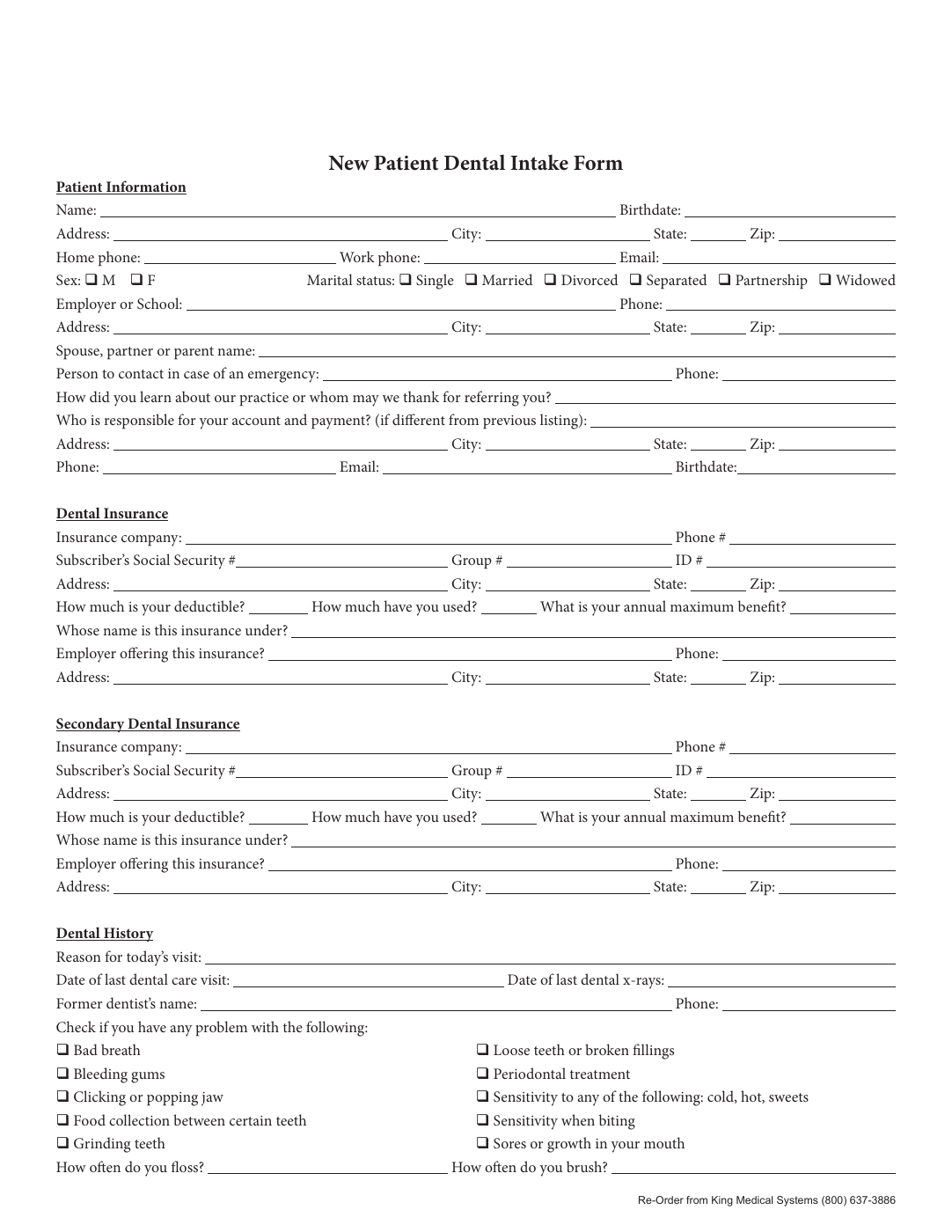
Renamed patient intake form showing clearer field names before mapping and fill.
Name cleanup matters because reliable auto-fill starts with fields that mean something beyond their original PDF widget labels.

Why bad field names break automation even when the PDF looks fine

A PDF can look perfectly usable to a person and still be weak for automation if the field names are vague, duplicated, or inherited from an old authoring tool. Search and mapping logic need a stable way to understand what each field represents. Names like Text1, Field_17, or repeated generic labels create ambiguity that causes mapping errors later.

That is why field naming is not cosmetic. It is part of the template contract. Better names make mapping easier, make QA easier, and make future edits easier when someone reopens the template months later.

How AI rename improves downstream mapping quality

Rename helps by turning weak field metadata into something closer to the language used in your real schema. Instead of forcing the map step to guess from noisy names, DullyPDF can use visual context and surrounding labels to suggest more meaningful field identifiers first. That usually improves the quality of the mapping pass that follows.

This is especially useful on dense packets, multi-page forms, and documents where similar labels repeat across sections. Better names create less cleanup work and reduce the chance that a field is technically mapped but semantically wrong.

A naming standard worth keeping across templates

The strongest teams keep naming conventions stable across all recurring templates. Dates should look like dates, checkbox groups should have coherent group keys, and person or policy fields should use consistent prefixes rather than whatever the PDF happened to suggest the first time.

That discipline pays off later when templates are updated or grouped. Instead of debugging one-off naming oddities on each form, teams get a cleaner library of reusable templates that are easier to map, test, and maintain.

Validate the fillable form field name workflow with one real record

A useful fillable form field name test starts with one document your team already recognizes, not a perfect demo PDF. Open the existing file, review detection, rename ambiguous fields, confirm checkbox and radio behavior, and save the template only after the field list matches the way the document is used in practice.

Then fill one representative record end to end. Include long names, blank optional values, dates, yes/no choices, and any calculated or scannable fields the page depends on. That single controlled run exposes most template issues before they become repeated output problems.

Choose data and output paths for fillable form field name

Search & Fill is the right first path when an operator should pick a record and inspect the result before export. It works with row data from CSV, XLSX, JSON, or stored respondent records. SQL and TXT files should be treated as schema-only mapping inputs; database-backed production workflows should query the database elsewhere and send JSON through API Fill.

Output mode matters too. Editable PDFs are useful when someone will continue working in live fields. Flat PDFs are safer when the completed record goes to customers, employees, agencies, signers, or archive systems because the visible values are baked into the page instead of depending on the recipient PDF viewer.

Production checklist for fillable form field name

The fillable form field name workflow is ready to reuse when a teammate can clear the document, rerun the same source record, and produce the same visible PDF without remembering hidden cleanup steps. If the result depends on one person knowing which field to fix manually, the template still needs review before it belongs in a repeat workflow.

  • The saved template uses stable field names and reviewed field types.
  • Source headers or API keys match the template schema without ambiguous duplicates.
  • Checkbox, radio, calculated, image, barcode, and signature fields have been tested if the workflow uses them.
  • At least one flat output and one editable output have been opened in the PDF viewers recipients are likely to use.

Why teams use Fillable Form Field Name

  • Use AI-assisted rename to convert inconsistent labels into stable names.
  • Align renamed fields with schema headers for dependable fill behavior.
  • Improve downstream search and fill quality with clean field naming.

Implementation signals for Fillable Form Field Name

  • Rename and map flows expose confidence output for QA review.
  • Field naming updates can be verified before template save.
  • Supports mixed field types including text, date, signature, and checkbox.

Need deeper technical details about fillable form field name? Use the Rename + Mapping docs and Search & Fill docs to validate exact behavior.

Frequently asked questions about Fillable Form Field Name

Why does fillable form field naming matter?

Consistent field names improve mapping accuracy and reduce missing values during automated fill runs.

Can I rename fields without changing PDF appearance?

Yes. Naming changes happen in template metadata and do not alter the visual PDF source layout.

Can I combine field rename with database mapping?

Yes. DullyPDF supports rename-only, map-only, and combined rename-plus-map workflows.

Guides for Fillable Form Field Name

These walkthroughs and comparison posts cover the same workflow cluster from an operator point of view, which helps you move from a route summary into a more specific implementation path.

Docs for Fillable Form Field Name

Use these docs pages to verify the exact DullyPDF behavior behind fillable form field name before you ship it as a repeat workflow.

Related routes for Fillable Form Field Name

These adjacent workflow pages cover nearby search intents teams compare while evaluating fillable form field name.