Commercial workflow page

Add PDF417 Barcode Fields to Fillable PDFs

Add PDF417 barcode helper fields to fillable PDF templates for dense structured data, ID-style records, transport paperwork, and machine-readable document workflows.

Workflow examples for Add PDF417 Barcode Field to PDF

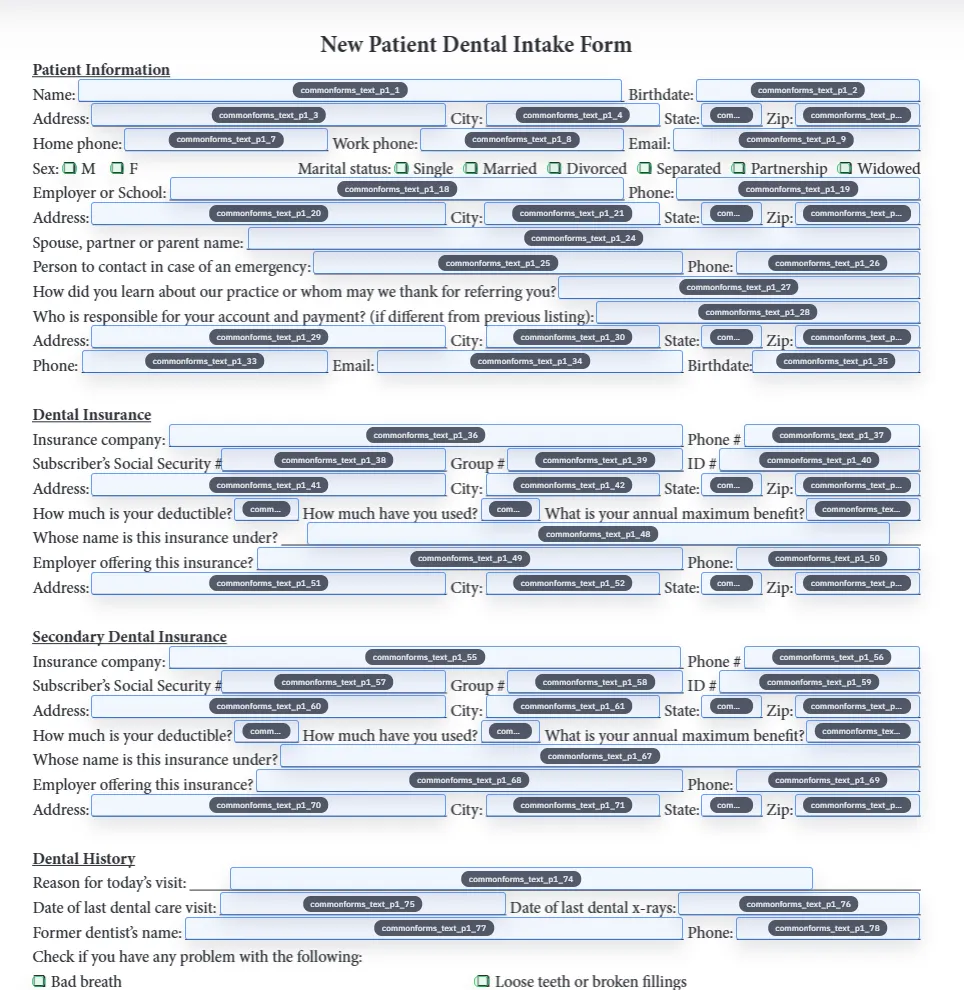
A DullyPDF PDF template preview showing multiple source values combined into one PDF417 barcode field.
PDF417 helper fields are useful when one scannable block should carry several structured record facts from the template.
Detected fields overlaid on a source PDF inside DullyPDF before PDF417 helper fields are added.
Use PDF417 when the encoded payload is denser than a QR link or a short 1D identifier.
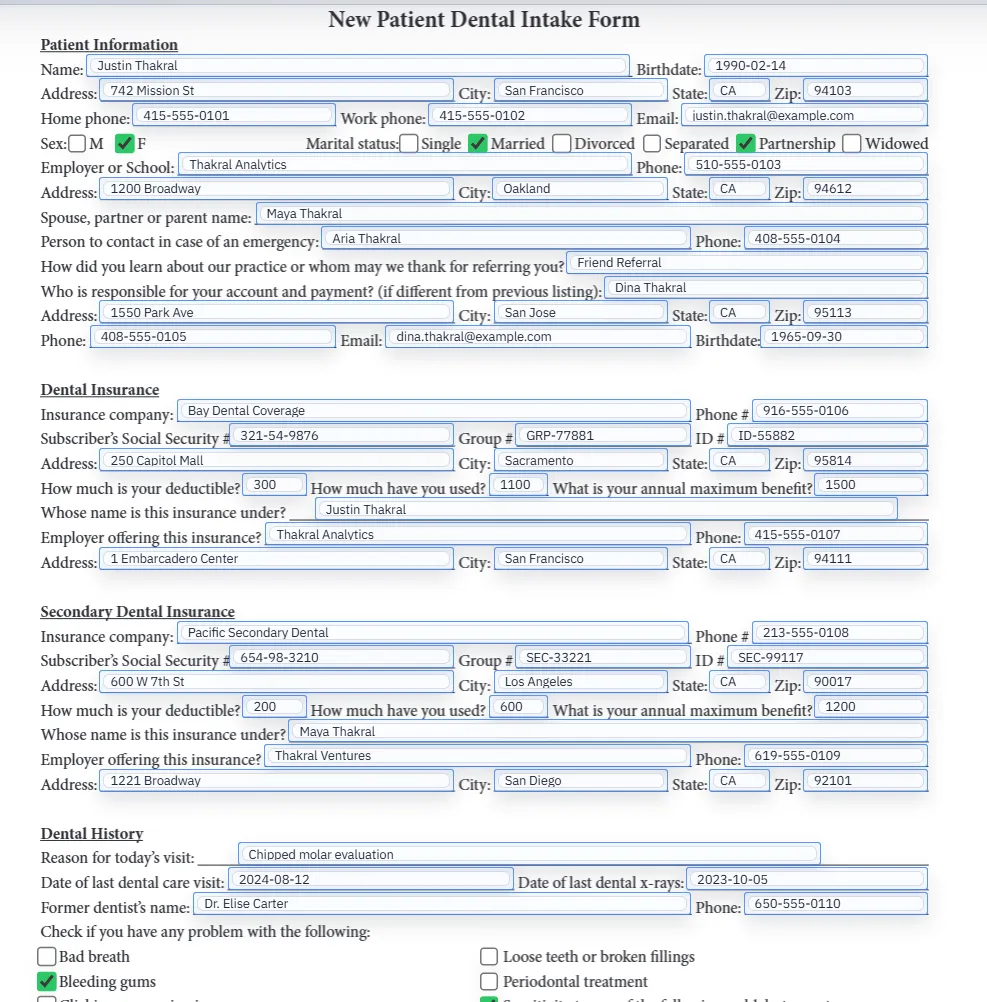
Filled PDF preview representing a final output after template values have been applied.
The real test is the completed PDF: the PDF417 code needs to scan at the final printed or shared size.

What a PDF417 barcode field solves in a PDF form

PDF417 is useful when a completed PDF needs one scannable block that carries several pieces of structured record data. A QR code often points to a URL. A 1D barcode often carries a short identifier. PDF417 sits in the middle: it can represent a denser payload on the page without requiring the recipient to retype the facts printed elsewhere in the document.

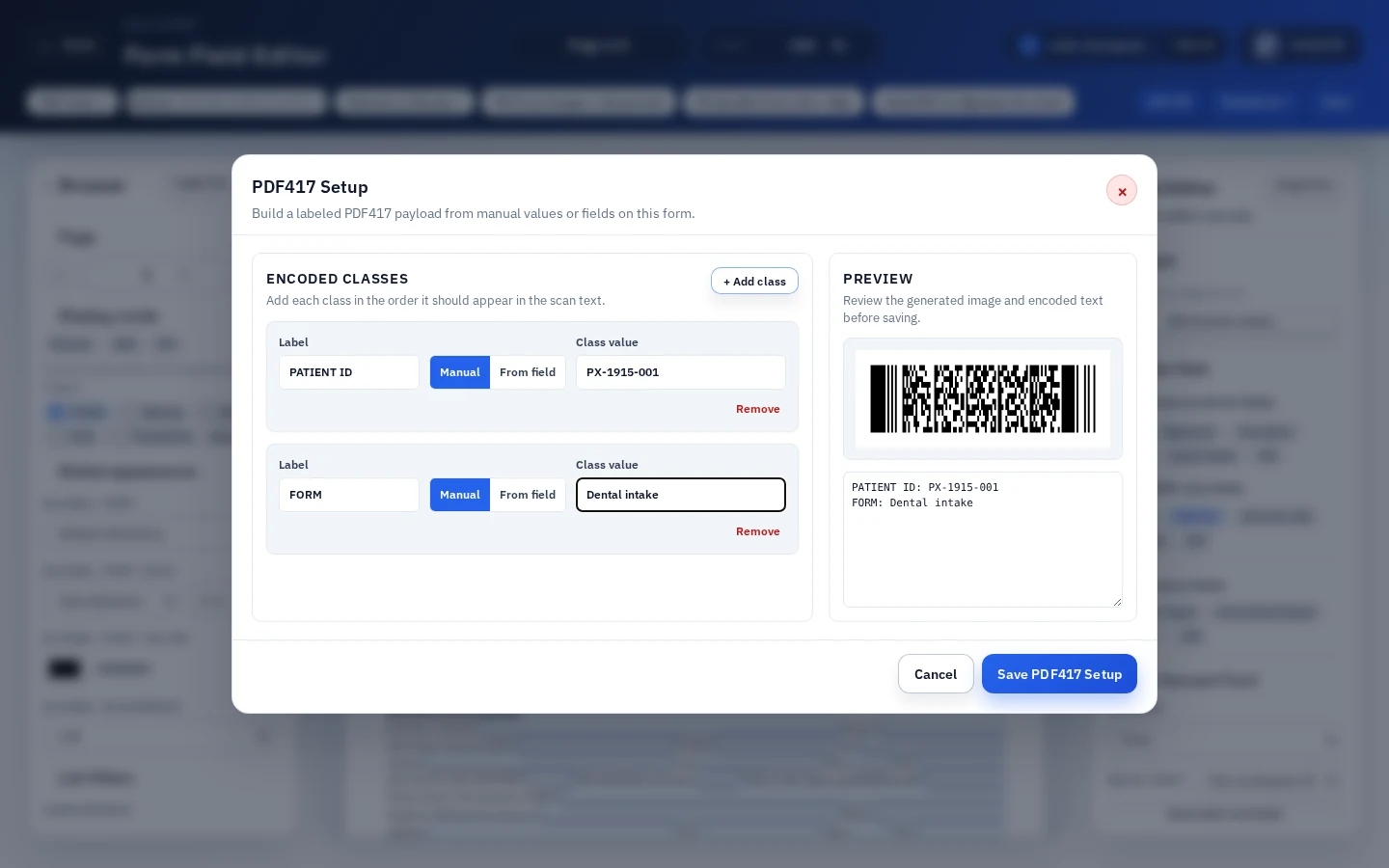
In DullyPDF, a PDF417 barcode field is a template helper. You draw the helper region on the existing PDF, configure the labeled values that should be included, preview the generated code, and export final PDFs where the code is stamped into the page content.

  • Best fit: IDs, transport records, shipping paperwork, credential packets, government forms, and operational documents where a scanner needs structured facts.
  • Poor fit: retail product barcode licensing, packaging labels, or Acrobat-native barcode fields that must recalculate inside Acrobat.

PDF417 versus a generic barcode image

A generic PDF417 generator can create an image. That is fine for a one-off code, but it does not solve template placement, data mapping, or repeat output. The code still has to be manually pasted into the PDF, aligned with the form, and regenerated every time a record changes.

DullyPDF targets the repeatable PDF workflow instead. The PDF417 field stays attached to the template geometry and can be filled from the same reviewed data layer used by Search & Fill, Fill By Link, or API Fill. The output is the complete PDF, not just a downloaded barcode image.

How DullyPDF builds the PDF417 payload

DullyPDF PDF417 helpers use configured barcode classes. Each class has a label and a value source. At generation time, DullyPDF combines the configured classes into the scan text used to render the PDF417 image. This is why PDF417 is the right helper when one code needs to carry several record facts instead of a single field value.

That power also creates a quality requirement. The class labels and order should be intentional. A scanner or downstream system should receive predictable text, not a pile of unrelated values. Start with the minimum fields the receiving workflow needs, then add more only when the scanner process can use them.

Acrobat barcode fields and DullyPDF helper fields are different

Adobe Acrobat exposes Barcode Field Properties and lets form authors choose barcode symbologies including PDF417 and QR Code.1 That Acrobat workflow is native to Acrobat and can use selected fields or custom JavaScript inside the PDF.

DullyPDF PDF417 helpers are different by design. They are DullyPDF template metadata that render into page content during final output. That is the right model when the completed PDF should print, email, and archive with a visible scannable code. It is not the right model if the requirement is an editable Acrobat barcode field that keeps recalculating after the file leaves DullyPDF.

Layout and scan QA for PDF417 in PDFs

PDF417 codes can become dense quickly. A code that looks acceptable in the editor can scan poorly after compression, printing, or resizing. The safest setup is to test the longest realistic payload, export a completed PDF, and scan it at the final physical size with the same devices the workflow will use.

Leave enough white space around the code, avoid placing it where the page will be folded or stamped, and keep the field large enough for the payload. If scan quality is weak, reduce the encoded data, increase the field area, or move long record details behind a QR URL and keep PDF417 for the values the scanner truly needs offline.

When a PDF417 page should link to data workflows

The strongest PDF417 use cases are data workflows, not manual drawing workflows. If the values are already in CSV rows, JSON records, database exports, or a respondent submission, connect the template fields first, then let the PDF417 helper render from those values. That keeps the barcode synchronized with the human-readable fields on the page.

This is also where DullyPDF can outrank generic barcode tools. The content should answer the real operator question: how do I place a PDF417 barcode inside a reusable PDF form and keep it tied to record data?

Why teams use Add PDF417 Barcode Field to PDF

  • Place PDF417 helper regions on an existing PDF template without rebuilding the document layout.
  • Combine multiple labeled source values into one scan text payload when a code needs more than a single URL or short ID.
  • Render the generated PDF417 code into final PDF page content for printed, emailed, and archived output.

Implementation signals for Add PDF417 Barcode Field to PDF

  • DullyPDF PDF417 helpers can combine every configured barcode class into one generated scan text value.
  • PDF417 helper placement is stored with the saved template so repeat fills keep the same reviewed geometry.
  • Editable round-trip exports keep helper metadata for DullyPDF reopen; flat final exports stamp the PDF417 image into the page.
  • Adobe Acrobat barcode-field documentation lists PDF417 as a supported barcode symbology, but DullyPDF renders a helper image rather than creating an Acrobat JavaScript barcode field.

Need deeper technical details about add pdf417 barcode field to pdf? Use the Rename + Mapping docs and Search & Fill docs to validate exact behavior.

Frequently asked questions about Add PDF417 Barcode Field to PDF

Can I add a PDF417 barcode field to a PDF form?

Yes. DullyPDF lets you draw PDF417 helper fields on an existing PDF template and generate a PDF417 image from configured barcode classes.

Can a PDF417 field include more than one value?

Yes. DullyPDF PDF417 helpers can combine multiple labeled classes into one scan text payload.

Is this a native Acrobat PDF417 barcode field?

No. DullyPDF uses helper metadata and renders the PDF417 output into the final PDF page content. Use Acrobat when you need a native Acrobat barcode field that recalculates inside Acrobat.

When should I use PDF417 instead of QR Code?

Use PDF417 when the code needs to carry denser structured data. Use QR Code when the main job is a URL, verification link, portal link, or mobile-friendly lookup.

What should I test before publishing a PDF417 template?

Export a final PDF with the longest realistic payload, print or zoom it at the expected size, and scan it with the same devices the workflow will use.

Legal footnotes and sources for Add PDF417 Barcode Field to PDF

  1. 1.Adobe Acrobat | Add barcode fields, including PDF417 and QR Code symbologies

Related setup docs

Use these DullyPDF docs when you are ready to configure PDF417 helper fields against real template data and verify the generated output.

Docs for Add PDF417 Barcode Field to PDF

Use these docs pages to verify the exact DullyPDF behavior behind add pdf417 barcode field to pdf before you ship it as a repeat workflow.

Related routes for Add PDF417 Barcode Field to PDF

These adjacent workflow pages cover nearby search intents teams compare while evaluating add pdf417 barcode field to pdf.